NimbleSurveys
Nimble Surveys is the Assignment that I did for the very first round of mine. You guys can use it as a documentation for yourself or an sample project configuration if you want.
Summary
| Latest Version | Unknown |
|---|---|
| License | Unknown |
| CI Status | Failing |
| Stars | 1 |
| Forks | 0 |
| Open Issues | 0 |
| Last Commit | 2024-01-18 |
| Downloads | 0 |
| Last Indexed | 2026-08-02 04:47 |
Installation
nimble install NimbleSurveys
choosenim install NimbleSurveys
git clone https://gitlab.com/tompham/nimblesurveys
OS Compatibility
| Platform | Linux | macOS | Windows | FreeBSD | OpenBSD | NetBSD | Android | iOS | WASM | Embedded |
|---|---|---|---|---|---|---|---|---|---|---|
| NimbleSurveys | ✓ | ✓ | ✓ | - | - | - | - | - | - | - |
Source
| Repository | https://gitlab.com/tompham/nimblesurveys |
|---|---|
| Homepage | https://gitlab.com/tompham/nimblesurveys |
| Registry Source | gitlab |
README
Introduction
🍿 NimbleSurvey is the small project which is writed by more than 90% by Swift
🍿 You can use it as the sample documation for yourself or could be inform me if you are facing any issue
What I have done:
Required:
-
🥑 Authentication
- ✅ Implement the login authentication screen.
- ✅ Implement the OAuth authentication including the storage of access tokens.
- ✅ Implement the automatic usage of refresh tokens to keep the user logged in using the OAuth API.
-
🥑 Home Screen
- ✅ On the home screen, each survey card must display the following info:
- Cover image (background).
- Name (in bold)
- Description
- ✅ The list of surveys must be fetched when opening the application.
- ✅ Show a loading animation when fetching the list of surveys.
- ✅ The navigation indicator list (bullets) must be dynamic and based on the API response.
- ✅ On the home screen, each survey card must display the following info:
Optional:
- ✅ Authentication: implement the forgot password authentication screen.
Bonus
- ✅ Unit Test
- ✅ UI Test
App Architecture
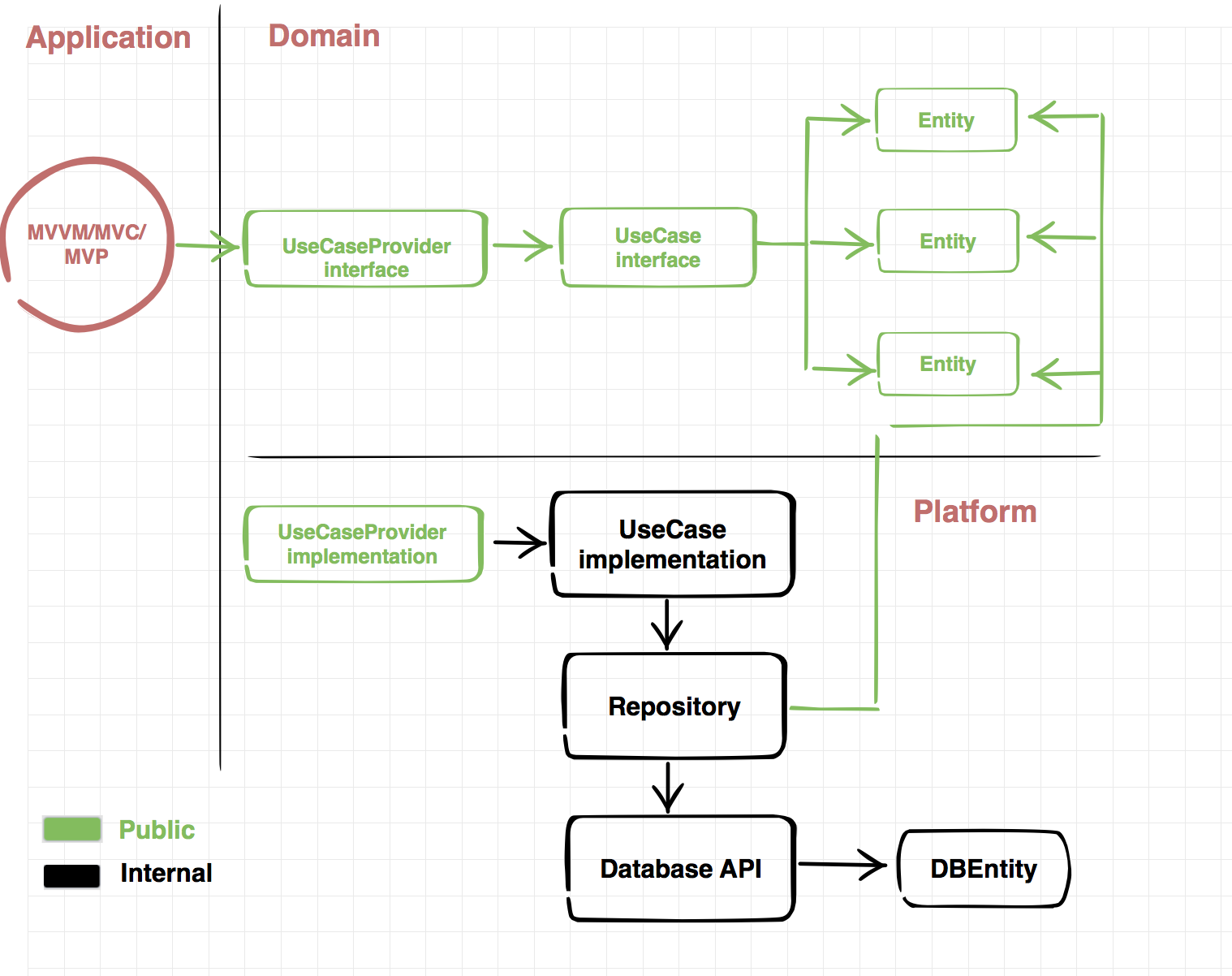 This ap is using the MVVM-R + Clean Architecture
Reference links
-Clean Architecture Documentation -MVVM Architecture Documentation
Getting started
You'll need a working MacOS development environment with Xcode 15 to use this template. You can find instructions to get up and running on the Apple Xcode website.
How to setup project
1. Project Enviorment:
- You could use the
XCodelatest: (15.0 is still possible) - Swift version:
5.0 - iOS version minimum:
10.0
2. Install Dependendices framework:
- 👉🏻 Open terminal
- 👉🏻 Navigate to your root project directory
- 👉🏻 Run:
pod install - 👉🏻 Run:
open NimbleSurveys.xcworkspace🍀 Note: It could be take more than 1 minutes lah.
How to run Unit Test:
We are using Cuckoo for mock generating
1. How to add new protocol to generate the mocks
- Once you created the new protocol and want to use Cuckoo to generate the stub's functions for this protocol.
- Please add the new Protocol to file:
/scripts/cuckoo-generate-mocks.sh
Example:
    FILES=( \
        "DecoderProtocol.swift" \
    )
2. How to generate the mocks
- If you faced the issue Permission denined please run:
chmod +x scripts/cuckoo-generate-mocks.sh - Once you added the new protocol, you could run:
fastlane generate_mocks
👉🏻 This will generate all the stubs for your protocol to the directory: NimbleSurveysTests/Mocks/GeneratedMocks.swift
3. How to run the unit-test;
- Change the schema to NimbleSurveysTests
- Run test
3. How to run the ui-test;
- Change the schema to NimbleSurveysUITests
- Run test
Fastlane install
for fastlane your could follow the setup evironment document Here: Fastlanne
- Use fastlane for pushing the app to TestFlight:
fastlane beta - Use fastlane for generating the mocks file:
fastlane generate_mocks