tide
Modular terminal editor framework
Summary
| Latest Version | 0.1.0 |
|---|---|
| License | MIT |
| CI Status | Failing |
| Downloads | 0 |
| Last Indexed | 2026-09-04 07:26 |
Tags
Authors
- Arun George Saji
Installation
nimble install tide
choosenim install tide
git clone https://github.com/arungeorgesaji/tide
OS Compatibility
| Platform | Linux | macOS | Windows | FreeBSD | OpenBSD | NetBSD | Android | iOS | WASM | Embedded |
|---|---|---|---|---|---|---|---|---|---|---|
| tide | ✓ | ✓ | ✓ | - | - | - | - | - | - | - |
Dependencies
| Package | Version | Optional |
|---|---|---|
| nim | - | No |
| illwill | - | No |
| regex | - | No |
Source
| Repository | https://github.com/arungeorgesaji/tide |
|---|---|
| Homepage | https://github.com/arungeorgesaji/tide |
| Registry Source | nimble_official |
README
Tide
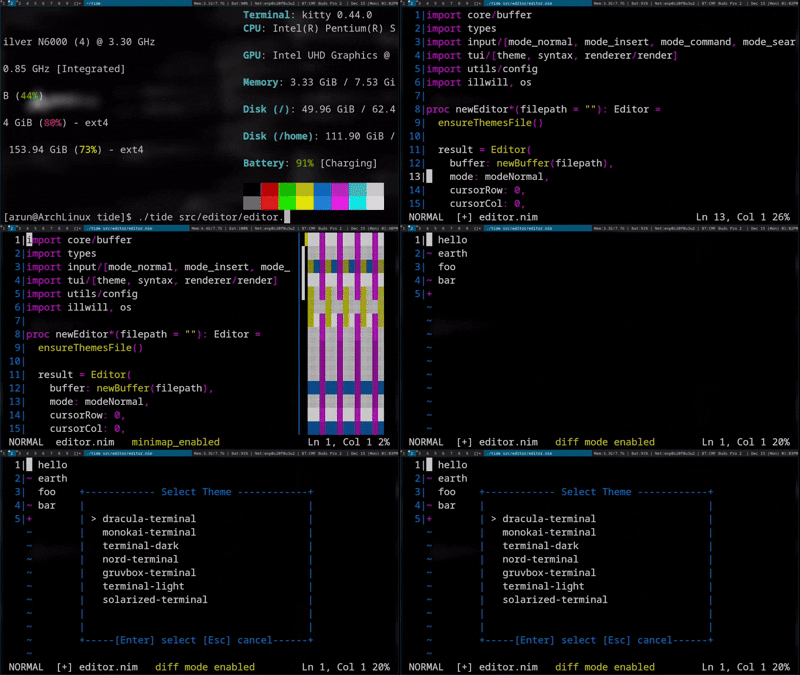
A Vim-like modal text editor written in Nim using the illwill terminal library.
Installation
You can install Tide using Nim's package manager, Nimble. Run the following command:
nimble install tide
Features
- Modal editing (Normal, Insert, Command, Diff)
- Search functionality with forward/backward navigation
- Syntax highlighting with language detection
- Minimap
- Customizable themes
- Undo/Redo support
- Line numbering (toggleable)
- Vim-style commands and navigation
- Yank/paste operations
Keybindings
Normal Mode
Navigation
h/←- Move cursor leftl/→- Move cursor rightj/↓- Move cursor downk/↑- Move cursor up0- Move to start of line$- Move to end of lineg- Go to first lineG- Go to last linew- Move forward one wordb- Move backward one worde- Move to end of wordHome- Move to start of lineEnd- Move to end of linePageUp- Scroll up one pagePageDown- Scroll down one page
Editing
i- Enter insert mode at cursora- Enter insert mode after cursorA- Enter insert mode at end of lineo- Open new line below and enter insert modeO- Open new line above and enter insert modex- Delete character under cursorX- Delete character before cursordd- Delete current lineyy- Yank (copy) current linep- Paste below current lineP- Paste above current lineu- Undo last change
Search
/- Enter search mode (search forward)?- Enter search mode (search backward)n- Repeat search in the same directionN- Repeat search in the opposite direction
Other
L- Toggle line numbers:- Enter command modeEsc- Cancel pending operationq- Quit editor
Count Prefix
Many commands support a count prefix:
- 5j - Move down 5 lines
- 3w - Move forward 3 words
- 10k - Move up 10 lines
Search Mode
Search mode is entered by pressing / in normal mode or ? for backward search.
- Type your search pattern
Enter- Execute search and jump to first matchBackspace- Delete character in search bufferEsc- Cancel search and return to normal mode
After executing a search:
- n - Find next occurrence (wraps around to beginning)
- N - Find previous occurrence (wraps around to end)
The status bar will display the position of found matches (e.g., "Pattern found at 42:15").
Insert Mode
Esc- Return to normal modeEnter- Insert new lineBackspace- Delete character before cursorDelete- Delete character under cursor- Arrow keys,
Home,End,PageUp,PageDown- Navigate while in insert mode - Any printable character (space through
~) - Insert character
Command Mode
Commands are entered after pressing : in normal mode.
File Operations
:w- Write (save) file:q- Quit editor:q!- Force quit without saving:wqor:x- Write and quit
Diff Mode
:diff <file1> <file2>- Open two files in diff mode
Display Options
:set numberor:set nu- Show line numbers:set nonumberor:set nonu- Hide line numbers
Syntax Highlighting
:syntax on- Enable syntax highlighting (auto-detects language):syntax off- Disable syntax highlighting
Minimap
:minimap on- Enable minimap:minimap off- Disable minimap
Themes
:theme <name>- Switch to specified theme:themes- Menu to list and select themes with preview
Others
:pwd- Print working directory:version- Show Tide version information
Navigation
- Arrow keys,
Home,End,PageUp,PageDownwork in command mode Backspace- Delete character in command bufferEsc- Cancel and return to normal modeEnter- Execute command
Themes
Tide supports customizable color themes. Use :themes to list available themes and :theme <name> to switch themes.
Syntax Highlighting
Syntax highlighting is automatically detected based on the file extension when you enable it with :syntax on. Supported languages depend on your configuration.